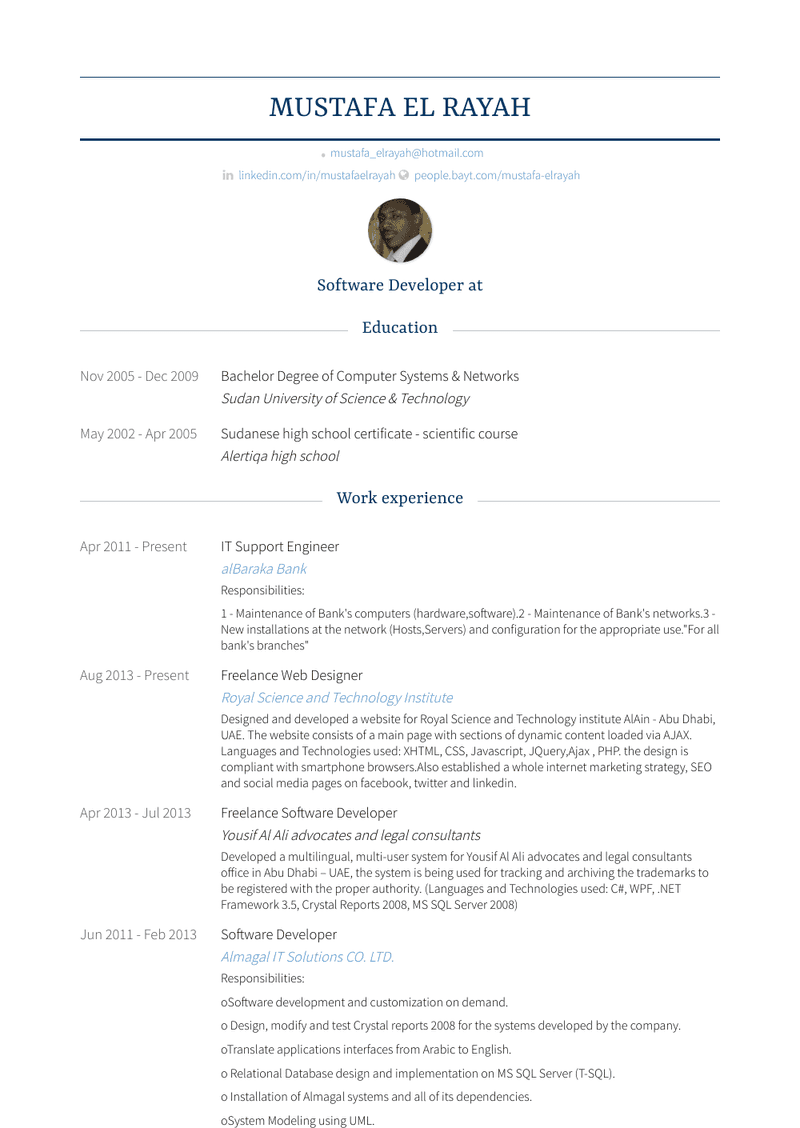
What Do Hiring Managers Look for in an IT Support Resume?
- Strong technical skills in troubleshooting, resolving hardware and software issues, and managing IT systems.
- Knowledge of operating systems, networking, and commonly used software platforms.
- Excellent communication skills to explain technical solutions to non-technical users.
- Proficiency in tools like Windows Server, Active Directory, and remote desktop software.
- Experience in documenting support tickets and following IT service management (ITSM) processes.
- Relevant certifications such as CompTIA A+, Microsoft Certified: Modern Desktop Administrator, or ITIL Foundation.
How to Write an IT Support Resume?
To craft a professional IT Support resume, follow these steps:
- Select a clean and professional IT Support resume template.
- Write a concise summary emphasizing your technical expertise, problem-solving skills, and certifications.
- Detail your work experience, focusing on troubleshooting, user support, and system maintenance.
- Highlight certifications and technical training in a dedicated section.
- Include skills like ticket management, remote support, and software installation in a skills section.
- Proofread for clarity, accuracy, and professionalism.
Boost your IT career with a professionally crafted resume. Our IT resume writing service highlights your technical expertise, problem-solving skills, and industry impact to help you stand out in the competitive tech job market.
Struggling to make your it support resume stand out? Let our AI resume tool do the hard work—analyze job requirements, optimize your content, and create a resume that gets noticed.
Write an effective IT Support resume header by:
- Displaying your full name prominently at the top.
- Adding a professional title such as "IT Support Specialist" or "Help Desk Technician."
- Providing contact information: phone number, professional email, and LinkedIn or portfolio link.
- Optionally, including your city or region if relevant for the role.
John Doe, Tech Support Guy, johndoe123@gmail.com
John Doe, IT Support Specialist | Chicago, IL | Phone: (555) 555-5555 | Email: john.doe@gmail.com | LinkedIn: linkedin.com/in/johndoe
How to Write a Professional IT Support Resume Summary?
Use this template to craft your summary:
"IT Support Specialist with [number] years of experience in [specific areas, e.g., technical troubleshooting, system administration]. Skilled in [key skills, e.g., Windows Server, networking]. Proven success in [key achievements, e.g., resolving technical issues, improving system uptime]."
Examples:
- "Experienced IT Support Specialist with 5+ years in providing technical assistance and maintaining IT systems. Proficient in Windows Server, Active Directory, and troubleshooting, achieving a 95% first-call resolution rate."
- "Dedicated Help Desk Technician specializing in remote support and network troubleshooting. Proven ability to resolve technical issues quickly, reducing downtime by 30%."
IT Support Resume Example
IT Support Specialist - Corporate IT
- Provided technical support for 200+ users, resolving hardware, software, and network issues.
- Managed Active Directory, creating and managing user accounts and group policies.
- Installed, configured, and maintained IT equipment, including laptops, printers, and routers.
- Documented all support activities in ticketing systems, ensuring SLA compliance.
- Conducted user training sessions to enhance technology adoption and minimize support requests.
IT Support Resume Example
Help Desk Technician - Managed Services Provider
- Delivered remote IT support to clients, resolving 90% of issues within the first interaction.
- Diagnosed and resolved connectivity issues, including VPN, Wi-Fi, and LAN networks.
- Assisted with the deployment and upgrade of software across multiple client environments.
- Escalated complex technical issues to higher-level support, ensuring timely resolution.
- Maintained accurate records of incidents, changes, and updates in the ITSM system.
IT Support Resume Example
Desktop Support Analyst
- Provided on-site support for hardware and software issues, achieving a 98% customer satisfaction rate.
- Installed and configured operating systems and applications on new employee workstations.
- Troubleshot hardware malfunctions, including desktops, monitors, and peripheral devices.
- Assisted in IT asset inventory management, ensuring accurate tracking and reporting.
- Supported migration to cloud-based email systems, minimizing downtime for users.
IT Support Resume Example
IT Support Specialist - Education Sector
- Supported IT systems across a campus with 500+ students and staff.
- Monitored and maintained computer labs, ensuring all equipment was operational.
- Provided training to faculty on using digital tools for teaching and administration.
- Configured and maintained AV equipment for classrooms and events.
- Ensured compliance with IT security policies, implementing software updates and patches.
IT Support Resume Example
Technical Support Specialist - Healthcare Industry
- Resolved technical issues for medical staff, ensuring minimal disruption to patient care.
- Supported proprietary healthcare applications and electronic health record (EHR) systems.
- Performed regular backups and implemented disaster recovery protocols.
- Conducted system performance checks and recommended hardware upgrades.
- Improved support response times by implementing ticket prioritization workflows.
Additional Sections for an IT Support Resume
- Certifications (e.g., CompTIA A+, Microsoft Certified: Modern Desktop Administrator, ITIL Foundation)
- Technical Skills (e.g., Active Directory, Networking, Remote Desktop Support)
- Languages (e.g., Spanish, French, Mandarin)
- Awards and Recognitions (e.g., Employee of the Month, Best IT Support Team)
- Volunteer Experience (e.g., community tech support, nonprofit IT projects)
Top IT Support Resume Skills for 2025
- Technical Troubleshooting and Problem-Solving
- Hardware and Software Installation
- Network Configuration and Support
- Remote Desktop Support (RDP, TeamViewer)
- IT Service Management (ITSM) Tools
- Operating Systems (Windows, macOS, Linux)
- Active Directory and Group Policy Management
- Cloud Computing Support (Office 365, Google Workspace)
- Customer Service and Communication Skills
- Cybersecurity Awareness and Protocols
How Long Should My IT Support Resume Be?
IT Support resumes should typically be 1 page long. Focus on showcasing your technical expertise, problem-solving abilities, and contributions to successful IT operations to create a compelling document.
For assistance, explore resume templates or browse IT Support resume examples for inspiration.
Specific Metrics/KPIs to Include in a IT Support Resume
When showcasing your IT support skills, it's essential to provide concrete evidence of your effectiveness. Including specific metrics and key performance indicators (KPIs) demonstrates your ability to measure and improve performance. Here are some examples:
- Average resolution time for tickets
- Number of tickets resolved per day/week/month
- Percentage of first-contact resolutions
- Customer satisfaction ratings
- System uptime and downtime statistics
Certifications for a IT Support Resume
Certifications can set you apart from other candidates and demonstrate your commitment to staying current in the IT support field. Here are some relevant certifications to consider:
- CompTIA A+
- CompTIA Network+
- Microsoft Technology Associate (MTA)
- Apple Certified Mac Integration Technician (ACMIT)
- Cisco Certified Entry Network Technician (CCENT)
- ITIL Foundation (Information Technology Infrastructure Library)
Familiarity with various tools and platforms is crucial in the IT support role. Highlighting your proficiency in these areas can make your resume stand out. Here are some examples:
- Windows Server, Linux, or macOS administration
- Network management tools (e.g., SolarWinds, Nagios)
- Remote access solutions (e.g., TeamViewer, VNC)
- IT service management software (e.g., ServiceNow, BMC Remedy)
- Database management (e.g., SQL Server, MySQL)
- Virtualization technologies (e.g., VMware, Hyper-V)
Methodologies and Frameworks for a IT Support Resume
Demonstrating your understanding of methodologies and frameworks used in IT support can showcase your problem-solving skills and ability to work within established processes. Here are some examples:
- Incident management (ITIL)
- Problem management (ITIL)
- Change management (ITIL)
- Agile methodology
- DevOps principles
- Six Sigma (process improvement)
Choosing the right resume format can help you showcase your IT support skills effectively. Here are some tips:
- Functional resume: Emphasize skills and experiences rather than a chronological work history, which can be useful if you have extensive IT support experience but minimal job hopping.
- Combination resume: A mix of functional and chronological format, showcasing both your skills and work history. This is a versatile format for most candidates.
- Reverse-chronological resume: Highlights your work history in reverse order, starting with the most recent position. This format is preferred by many employers, as it provides a clear timeline of employment.
Choose the format that best showcases your IT support experience and makes you stand out to potential employers.