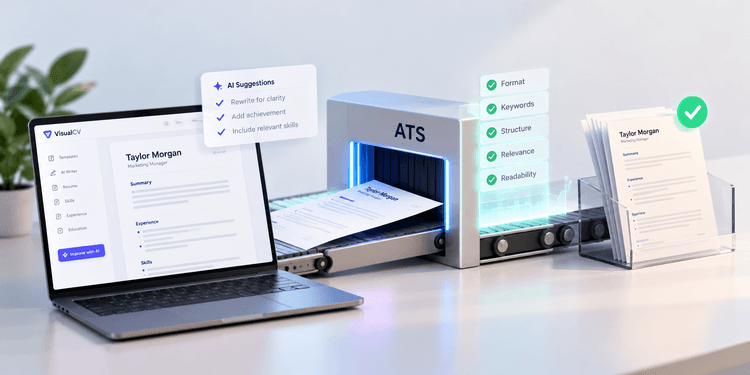
AI-written resumes can pass applicant tracking systems when they use clear formatting, relevant keywords, and accurate information. An ATS typically evaluates how well a resume can be parsed and how closely its content matches the role, not whether AI helped write it1.
Problems arise when AI produces generic language, repeats keywords unnaturally, invents qualifications, or introduces formatting that screening software cannot read correctly. A resume may technically pass the ATS and still fail to impress a recruiter if it lacks specific achievements or sounds disconnected from the applicant’s real experience.
With more than 7 million users in over 125 countries, VisualCV has seen that the strongest resumes make every element serve a clear purpose. For AI-assisted resumes, that means using technology to improve structure and wording while ensuring that each section accurately reflects the candidate’s experience, skills, and value. Every detail should help both the ATS and the hiring manager quickly understand why the applicant is a strong match for the role.
This guide explains how to review an AI-written resume for formatting, keywords, specificity, accuracy, and readability before submitting it to an employer.
Here are the steps for making an AI-written resume more likely to pass an ATS:
| Step | Action | Time Required | Key Output |
|---|---|---|---|
| Step 1 | Review the resume’s formatting and file structure | 10 to 15 minutes | A resume the ATS can parse correctly |
| Step 2 | Match relevant keywords to the job description | 15 to 25 minutes | Stronger alignment with the target role |
| Step 3 | Replace generic AI-generated wording | 20 to 30 minutes | Clear, specific accomplishment statements |
| Step 4 | Verify every skill, date, and claim | 10 to 20 minutes | An accurate and credible resume |
| Step 5 | Test readability and submit the correct file | 10 to 15 minutes | A polished, ATS-ready document |
Start by checking whether the resume uses a structure that an applicant tracking system can read accurately. Clear section headings, consistent spacing, and a simple layout help the software identify your work history, education, skills, and contact information.
Avoid placing essential details inside graphics, icons, text boxes, headers, or footers, since some systems may not parse them correctly4. Use standard headings such as Work Experience, Education, and Skills, and submit the file type requested in the job posting3.
| Use | Avoid |
|---|---|
| Standard section headings | Creative or unclear headings |
| Simple, consistent text formatting | Important information inside images |
| Clear dates and spacing | Complex columns and floating text boxes |
| Common, readable fonts | Decorative or difficult-to-read fonts |
| The employer’s requested file type | Unsupported or unusual formats |
Compare the AI-written resume with the job description before submitting it. Identify the skills, qualifications, tools, certifications, and responsibilities that appear most often, then check whether the resume uses the same relevant language where it accurately reflects your background2.
Include job-specific keywords naturally throughout the summary, skills section, and work experience. Avoid copying every phrase from the posting or adding qualifications you do not have, since keyword stuffing can make the resume harder to read and may create credibility problems during an interview.
| Action | Why It Matters |
|---|---|
| Review the main responsibilities | Identifies what the employer expects the person to do |
| Highlight repeated skills and qualifications | Reveals the role’s likely screening priorities |
| Compare the terms with your resume | Shows where relevant language may be missing |
| Add accurate keywords naturally | Improves alignment without making the writing repetitive |
| Review the final wording | Keeps the resume clear for both the ATS and the recruiter |
AI tools often produce polished statements that sound professional but say little about what you actually accomplished. Review each bullet point and replace vague responsibilities with details that show scope, results, or impact.
Add numbers, percentages, time frames, team sizes, or project outcomes where they are accurate and relevant. The goal is to make the resume useful to both the ATS and the recruiter by pairing job-specific language with evidence from your real experience.
| Generic AI-Written Statement | Stronger ATS-Friendly Version |
|---|---|
| Responsible for managing projects | Managed 12 client projects with a 96 percent on-time completion rate |
| Helped improve customer satisfaction | Increased customer satisfaction scores from 82 to 91 percent |
| Worked with cross-functional teams | Coordinated a six-person sales and product team during a software launch |
| Improved operational efficiency | Reduced monthly reporting time by eight hours through process automation |
Review the resume line by line to confirm that every detail is accurate. AI tools can introduce incorrect dates, inflated achievements, unsupported skills, or wording that sounds plausible but does not reflect your actual experience5.
Check job titles, employment dates, education, certifications, technical skills, and performance results against your records. Remove anything you could not confidently explain in an interview, and make sure the resume matches your LinkedIn profile and application responses.
| Item to Verify | What to Check |
|---|---|
| Employment dates | Confirm the correct months and years |
| Job titles | Use official titles or accurate clarifications |
| Skills | Include only abilities you can demonstrate |
| Achievements | Support results with real examples or evidence |
| Education | Verify the institution, program, and dates |
| Certifications | Confirm the correct name and completion status |
Test the finished resume before uploading it to an application portal. Copy the text into a plain-text document and check whether the sections, dates, job titles, and bullet points appear in the correct order.
Review the file for missing content, broken characters, or formatting that becomes confusing when visual design is removed. Then confirm that the file name is professional, the document uses the employer’s requested format, and the resume remains easy for a recruiter to scan.
| Review Area | Question to Ask |
|---|---|
| Parsing | Does the text appear in the correct order? |
| Keywords | Does the resume reflect the role’s required qualifications? |
| Specificity | Are accomplishments supported by details or numbers? |
| Accuracy | Can every claim be verified? |
| Readability | Can a recruiter understand the resume quickly? |
| File format | Does the document follow the employer’s instructions? |
Yes. AI-written resumes can pass ATS scans when they use readable formatting, relevant keywords, and accurate information. The ATS generally evaluates the document’s structure and content rather than whether AI helped create it.
An ATS does not normally reject a resume simply because it was created with ChatGPT or another AI tool. Problems are more likely when the resume contains poor formatting, weak keyword alignment, repetitive wording, or information the system cannot parse.
Employers may notice wording that sounds generic, repetitive, or disconnected from the candidate’s actual experience. A careful human review can reduce these signs by adding specific achievements, natural language, and accurate details.
Yes. Complex tables, graphics, icons, text boxes, and unusual layouts can make some resumes harder for an ATS to read. A simple structure with standard headings is usually safer.
No. Every AI-written resume should be reviewed for accuracy, formatting, specificity, tone, and relevance before submission. The final document should reflect your real experience and be easy for both the ATS and the recruiter to understand.
AI-written resumes can pass ATS scans, but the tool used to create the document matters less than the quality of the final result. A strong AI-assisted resume uses ATS-readable formatting, job-specific keywords, accurate details, and specific achievements that reflect the candidate’s real experience. Reviewing each section before submission helps ensure that the resume works for both the screening software and the recruiter who reads it next.
Last updated: October 09, 2026

Written by
Madison Norton
Resume Expert & VP Marketing
Madison is the VP Marketing and General Manager at VisualCV. He's a seasoned marketing leader, resume writing and career marketing expert and now helping people grow their own career marketing strategies to build a career they love.
Discover the best resume formats for 2026 with examples for every job and experience level, plus expert tips to format your resume and get hired faster.
August 7, 2025
Read post

Resume Expert & VP Marketing

Learning how to write a resume in 2025 is an important step in everyone's career. This step-by-step guide with resume examples will help you get started.
February 7, 2025
Read post

Community Success Manager & Resume Writing Expert
AI can change the way you write, and your resume is no exception.
November 27, 2023
Read post
Community Success Manager & Resume Writing Expert