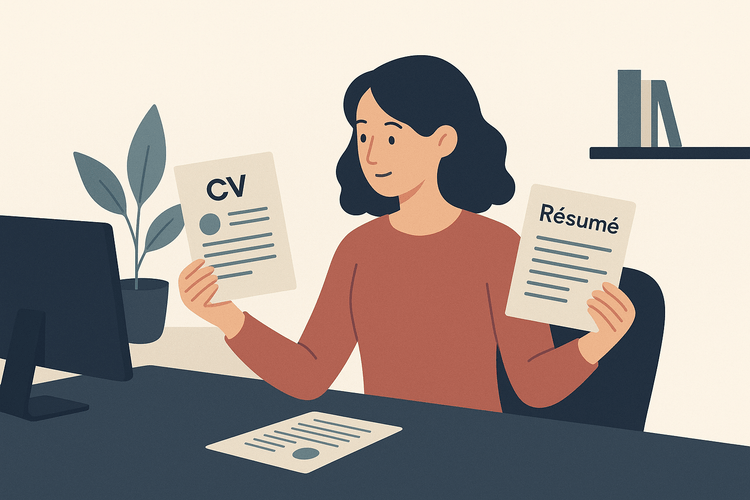
Choosing between a CV vs resume for an application can feel unnecessarily risky, especially when employers use the terms differently. Sending the wrong document, or using the right label with the wrong level of detail, can make it harder to show that you fit the opportunity.
With more than 7 million users in over 125 countries, VisualCV has learned that cv vs resume decisions depend on the role, location, and information the employer needs to assess. In practice, you need to match the document's length, focus, and level of detail to the specific opportunity. A resume builder can help organize the work, but the substance still has to come from your own experience and judgment.
After following the steps below, you will be able to tell a CV from a resume and submit the document that best fits your opportunity.
Here are the steps this guide covers:
| Step | Action | Time Required | Key Output |
|---|---|---|---|
| Step 1 | Identify each document's purpose | 5 minutes | Clear CV and resume definitions |
| Step 2 | Review length and content differences | 10 minutes | Side-by-side format comparison |
| Step 3 | Check the role and location | 5 minutes | Correct document selection |
| Step 4 | Customize the selected document | 20 minutes | Application-ready document |
Start by separating the documents by purpose. A CV is a comprehensive record of your academic and professional history, while a resume is a concise, targeted document tailored to a specific job application. For a U.S. federal job, your resume must include the information required in the job announcement.3
Terminology changes by region. Outside the United States, employers may use “CV” to mean the shorter document Americans call a resume, so read the posting and follow its requested format rather than relying on the document name alone.
CV or Resume at a Glance
| What to Do | Why It Matters |
|---|---|
| Match the document to its purpose | CVs document full history; resumes target roles |
| Check the intended audience | Academic employers commonly expect comprehensive records |
| Compare the requested detail | Resumes emphasize relevant, recent qualifications |
Put the two documents side by side and compare their space budgets first. A resume usually runs one or two pages, using a targeted summary, relevant skills, and recent work achievements to show fit for a specific role.1 A CV can run several pages because it records the breadth of an academic or research career, including education, research appointments, publications, presentations, grants, teaching, and professional service. In the cv versus resume decision, use reverse chronological order for jobs or appointments, then give the most relevant categories the most space.
Put role-specific achievements, transferable skills, and measurable results on your resume, then tailor the order and wording to the position.2 Put your complete academic record, peer-reviewed publications, research projects, grants, conference activity, and teaching experience on your CV. Do not force a full academic record onto a one-page resume, and do not pad a CV with outdated jobs, unrelated coursework, or minor activities that add no professional value.
CV vs Resume Format Comparison
| What to Do | Why It Matters |
|---|---|
| Match length to your goal | Resumes stay concise, CVs capture academic depth |
| Prioritize relevant sections | Resumes show achievements, CVs include research and grants |
| Customize without padding | Target resumes, keep CV details professionally relevant |
Start with the employer's language. Academic departments, research labs, medical institutions, and fellowship programs commonly ask for a CV because they need to review teaching, publications, research, grants, clinical work, or professional training. Most private-sector roles, including sales, operations, marketing, and corporate technology positions, ask for a resume focused on the qualifications most relevant to the opening.
Read the posting's application instructions, then check the country, industry, and required upload fields before choosing your document. If the posting says CV, submit a CV, but confirm whether the employer uses the term differently in that location. Do not include information that employers may not lawfully consider in hiring, such as protected characteristics.4 When the instructions are vague, email the recruiter or hiring contact before applying, and ask which document they expect.
Document Selection Checklist
| What to Do | Why It Matters |
|---|---|
| Read the posting's exact wording | Matches the employer's stated requirement |
| Check country and industry norms | Terminology varies by location and field |
| Ask the recruiter when unclear | Prevents submitting the wrong document |
Use the job description to rank the qualifications, accomplishments, and keywords that matter most for this opening. Move your strongest matching experience toward the top, and describe results with specific scope, tools, or outcomes. Organizing application materials around the role helps employers quickly identify your fit.2
Set aside 20 minutes to compare every section against the posting, starting with your summary and most recent relevant role. Tailor your resume to the position and use accurate job language where it fits, a practice supported by MIT Career and Professional Development resources.5 Check that headings, dates, fonts, and spacing are consistent, and save the file in the requested format. Remove outdated details and never add skills, credentials, or results you cannot support.
Final Pre-Submission Checklist
| What to Do | Why It Matters |
|---|---|
| Match keywords to proven experience | Shows clear relevance to the role |
| Proofread dates, names, and formatting | Prevents avoidable credibility errors |
| Confirm requested file and document type | Meets the employer's submission instructions |
Not always. In the United States, a CV is usually a detailed academic or research document, while a resume is a shorter summary for most industry roles. In some countries, employers use the terms interchangeably, so check the job posting and local application norms.
A resume is typically one page if you have under 10 years of experience, or two pages if you need space for relevant accomplishments. A CV can run several pages because it documents your full academic, research, teaching, publication, and presentation history. Do not add length just to fill pages, include only information that supports the type of role you want.
Send a CV when the employer specifically requests one or when you are applying for academic, research, medical, fellowship, or grant-related positions. You may also need a CV for roles outside the United States, where it is often the standard application document. If the posting uses unfamiliar terminology, review the requested sections before you submit.
Usually, no. Submitting a resume when a CV is requested can make it look as though you missed an instruction, especially for university or research applications that require publications, teaching experience, and credentials. If you only have a resume, expand it into a CV that includes the relevant full history before applying.
You do not need to rebuild the document from scratch, but you should tailor it for each application. Update your summary, reorder the most relevant experience, and mirror the job description's priorities with accurate examples from your background. Keep a master CV or resume so you can create targeted versions in 15 to 30 minutes.
Knowing when to use a CV versus a resume helps you present the right level of detail for every application. You can now identify the document an employer expects, match its format and scope to the role, and tailor it to the opportunity. Getting this choice right keeps recruiters focused on your qualifications, while sending the wrong document can make even strong experience harder to evaluate. Put that clarity to work by creating a targeted resume for your next application.
Last updated: September 15, 2026

Written by
Madison Norton
Resume Expert & VP Marketing
Madison is the VP Marketing and General Manager at VisualCV. He's a seasoned marketing leader, resume writing and career marketing expert and now helping people grow their own career marketing strategies to build a career they love.
Discover the best resume formats for 2026 with examples for every job and experience level, plus expert tips to format your resume and get hired faster.
August 7, 2025
Read post

Resume Expert & VP Marketing
AI can change the way you write, and your resume is no exception.
November 27, 2023
Read post

Community Success Manager & Resume Writing Expert

Learning how to write a resume in 2025 is an important step in everyone's career. This step-by-step guide with resume examples will help you get started.
February 7, 2025
Read post
Community Success Manager & Resume Writing Expert