A free resume builder should do more than pour your details into a template. The best ones format cleanly for the applicant tracking systems (ATS) that screen resumes before a human ever looks at them, help write sharper summaries of your prior achievements, and guide you all the way to a polished, job-ready document. The catch is that "free" means very different things from one platform to the next. Some plans stop at a template or two; others include ATS-ready designs, AI assistance, and real career tools before you pay a dime. This comparison sorts out which free plans are worth your time.
From June through August 2026, our team evaluated two dozen free online resume builders against six weighted criteria:
The table below shows the top six tools ranked according to our criteria, followed by in-depth reviews of each.
| Rank | Platform | Free plan strength | Templates | Free AI writing | Free PDF download | Career extras |
|---|---|---|---|---|---|---|
| 1 | VisualCV | Build one resume and test-drive all templates | 30+ | Yes, AI bullet enhancement and tailoring | Yes (watermarked; clean PDF with Pro) | Career journal trial |
| 2 | Teal | Unlimited resumes and job tracking | 100+ | Limited AI credits in free version | Yes, unlimited | Job tracker, cover letter tools, 1 email template per job stage |
| 3 | Resume.com | Truly free end to end | ~15 | Yes, AI writer | Yes | Indeed application integration |
| 4 | Indeed | Fully free, no paid tier | 1 | Yes, AI writing assist | Yes | Indeed application integration |
| 5 | Canva | Widest design library, free PDF export | Hundreds | Limited allowance in free version | Yes (standard templates) | None |
| 6 | Google Docs | Free with any Google account | ~5 | Gemini (general, not resume-specific) | Yes | None |
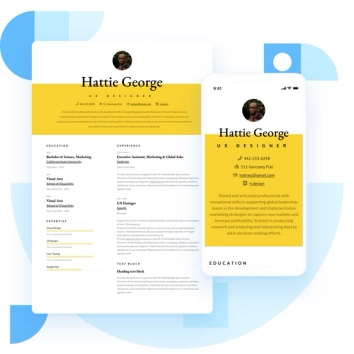
VisualCV is an online resume and career platform trusted by over seven million professionals across more than 125 countries. Its edge lies in its polish: 30+ professionally designed, ATS-ready templates you can test-drive in full on the free plan, plus AI-assisted writing to sharpen your work as you go. Every template is built for the parsing rules most applicant tracking systems follow, so a clean, recruiter-ready structure comes standard without having to engineer yourself.
VisualCV pulls further ahead of the competition with its builder. On the free plan you can test-drive all templates, build your first resume, and preview its formatting. You also gain trial access to the Career Journal, where career coaches will help craft a polished resume and assist in tracking your job search. Upgrading to the paid Pro tier fully unlocks their professional resume writing service, up to 100 tailored resume versions, a Word export, unlimited downloads, resume analytics, cover letter tools, and a shareable online resume site with a custom hosting domain. If you’re building a resume on a budget for a senior or specialist role, VisualCV is the strongest free-to-start option in this group.
Basic Info:
Summary of Online Reviews: Users praise the intuitive editor and polished templates, and many report faster interview callbacks after switching from other free tools. The most common critique is that the watermark on free downloads prompts an early upgrade.
Teal is the most generous free plan in this comparison, and if you’re running your own search, it’s outstanding. The free tier includes unlimited resume versions, unlimited PDF downloads, a browser extension for saving job postings, and (capped) AI credits for refining bullets, summaries, and cover letters.
Its AI Resume Analyzer scores your draft against a specific posting and tells you what to fix before you apply, the most targeted free ATS feedback here. Teal is built as a job-search workspace rather than a design studio or a career-presence platform, so it’s lighter on extras like a published portfolio or hands-on writing help when compared to options like VisualCV. Still, for running a self-directed job hunt, its free offerings are worth checking out.
Basic Info:
Summary of Online Reviews: Reviewers single out the ATS scoring and job tracker as standout tools for staying organized across a search. The most common critiques are the high price on the paid tier, and that Teal is more of a search manager than a resume design tool.
3. Resume.com, for a truly free, no-frills builder
Resume.com, owned by Indeed, is one of the few builders that stays free from beginning to end: build, download, and print in PDF or plain text with no paywalls. A step-by-step editor plus an AI writer for generating work-experience content make it fast and easy to get a solid, straightforward resume together.
The platform leans functional rather than fancy, with modest customization and templates that look fairly similar, and stops short of the job-specific tailoring and ATS scoring you get with products higher in this list. Saving or downloading requires a free Indeed account, and your resume is visible to Indeed employers unless you change your privacy settings, but for a genuinely free, no-catch resume you can finish and export in one sitting, it’s one of the most reliable options in our ranking.
Basic Info:
Summary of Online Reviews: Reviewers value that it’s genuinely free from build to download, with no paywall at export. Criticism primarily centers on the limited variety of templates available.
Indeed's built-in resume tool is genuinely free, with no paid tier and no download charge. A guided, form-based flow builds the resume, which then attaches directly to Indeed applications, which is handy if that’s where you apply most.
The builder offers optional AI help to polish your wording, though not the job-specific tailoring or ATS scoring you get higher up this list, and its template selection is thin; formatting can also shift when the PDF opens outside Indeed. While Indeed’s resume tools are a fast way to get a functional resume onto one platform, professionals in need of additional design or optimization will outgrow it quickly.
Basic Info:
Summary of Online Reviews: Users call it simple and effective for a quick, basic resume, with the direct application integration cited as its strongest point. Some note it’s most useful only inside Indeed itself, with notably reduced value once you take the resume elsewhere.
5. Canva, for design-first resumes
Canva is a design platform with hundreds of free resume templates and a drag-and-drop editor that makes visual customization effortless. The design range is the widest here by a distance, standard templates export to PDF at no cost, and for a visually striking one-page resume, nothing else on this list comes close.
That design freedom is also the catch. Independent testing in 2026 found a large majority of Canva's resume templates fail basic ATS parsing, because the multi-column layouts, icons, and text boxes that make them look good are exactly what confuses the software reading your resume first. A clean single-column template can still pass the scanning phase, so the recommended move is to keep your layout simple and run a copy-and-paste text check before using a template to apply. For creative and design-forward roles where a human sees the resume first, Canva shines; for ATS-screened corporate pipelines, enter with care.
Basic Info:
Summary of Online Reviews: Users love the ease of use and the breadth of free designs. The recurring frustrations are hitting a paywall when a font or element turns out to require Pro, and formatting that shifts or spills out of place on export.
Google Docs is free and requires nothing more than a Google account: no subscription, no paywall, cloud storage, unlimited edits, and unlimited PDF exports. Its gallery includes a few clean, single-column layouts that most ATS read without trouble, a dependable no-cost starting point.
Gemini can be used to refine highlighted text as you write, though it generally provides general-purpose help rather than resume-specific guidance, so the formatting and keyword calls remain yours to make. A plain single-column layout with no tables or text boxes is recommended from a formatting perspective, since not all Docs templates parse cleanly, and there’s no built-in ATS scoring to catch problems. Still, for anyone who enjoys full control at zero cost, and doesn’t mind doing the optimization by hand, it’s as reliable as free gets.
Basic Info:
Summary of Online Reviews: Users like that it’s free, familiar, and available anywhere they have a Google account. The common frustrations are fiddly formatting, spacing and alignment that shift as you edit or export, and a template selection that’s limited and generic next to dedicated resume tools.
We also broke the top free resume builders into three subcategories based on specialty.

Written by
Madison Norton
Resume Expert & VP Marketing
Madison is the VP Marketing and General Manager at VisualCV. He's a seasoned marketing leader, resume writing and career marketing expert and now helping people grow their own career marketing strategies to build a career they love.
Discover the best resume formats for 2026 with examples for every job and experience level, plus expert tips to format your resume and get hired faster.
August 7, 2025
Read post

Resume Expert & VP Marketing
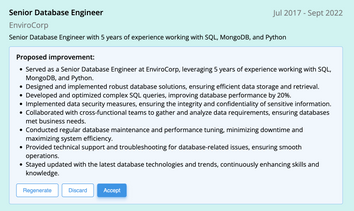
AI can change the way you write, and your resume is no exception.
November 27, 2023
Read post

Community Success Manager & Resume Writing Expert

Learning how to write a resume in 2025 is an important step in everyone's career. This step-by-step guide with resume examples will help you get started.
February 7, 2025
Read post
Community Success Manager & Resume Writing Expert