An ATS resume format is designed to make your resume easier for applicant tracking systems to read, organize, and pass along for review. The goal is not to remove all personality or design from your resume, but to use a structure that keeps important information clear and easy to identify.
Formatting choices such as section headings, columns, date styles, text placement, and file type can all affect how a resume is processed. A cleaner, more predictable layout can reduce the risk that key details such as your work history, skills, education, or contact information are interpreted incorrectly.
With more than 7 million users in over 125 countries, VisualCV has seen that strong resumes need to work for both people and the systems employers use to manage applications. That means creating documents that are visually polished while keeping the structure clear, the content easy to scan, and important qualifications accessible to applicant tracking systems.
This guide walks through how to build an ATS resume format step by step, from choosing the right layout and section headings to formatting experience, keywords, dates, and the final file before you apply.
| Step | What to Format | Recommended Approach | Key Goal |
|---|---|---|---|
| 1 | Overall layout | Use a simple, clearly ordered structure | Make the resume easy to parse |
| 2 | Section headings | Use standard labels such as Work Experience, Education, and Skills | Help ATS software identify content correctly |
| 3 | Work experience | Format job titles, employers, dates, and bullets consistently | Preserve your career information |
| 4 | Skills, keywords, and dates | Use relevant terms naturally and keep details standardized | Improve clarity and job alignment |
| 5 | Final document | Review formatting, consistency, and file type before submitting | Reduce avoidable parsing issues |
A strong ATS format is built around consistency. If the layout, headings, dates, and content follow a clear structure, applicant tracking systems are more likely to interpret the resume correctly, while recruiters can still scan it quickly.
An ATS-friendly resume layout should make information easy to read in a clear, predictable order. The safest approach is usually a simple structure that keeps your contact information, summary, experience, education, and skills easy to identify without relying on complex visual elements.
Single-column layouts are generally the most straightforward because they preserve a natural top-to-bottom reading order1. More complex designs can still work in some systems, but they may introduce unnecessary parsing risks if important details are split across columns, text boxes, or graphical elements.
The goal is not to make the resume visually plain. It is to keep design choices secondary to clarity so that both applicant tracking systems and recruiters can find the information they need quickly.
| Format Element | Recommended Approach | Use With Caution |
|---|---|---|
| Columns | Use a simple single-column structure | Complex multi-column layouts |
| Text placement | Keep important information in the main document body | Headers, footers, and text boxes |
| Graphics | Use sparingly and only when they are nonessential | Icons or graphics that contain important information |
| Fonts | Choose standard, readable fonts | Decorative or highly stylized fonts |
| Alignment | Keep text and sections consistently aligned | Heavily positioned or layered text |
| Spacing | Use consistent spacing between sections | Irregular spacing that disrupts reading order |
A clean layout gives your resume the best chance of being interpreted consistently while still allowing you to create a polished, professional document.
Applicant tracking systems are designed to recognize common resume sections, so clear and conventional headings are usually the safest choice. Labels such as Work Experience, Education, Skills, and Certifications make it easier for both software and recruiters to understand what each section contains.
Creative headings can make a resume feel more distinctive, but they may also make the structure less obvious. For example, replacing Work Experience with a label such as “My Journey” or Skills with “What I Bring” can create unnecessary ambiguity.
Keep section names simple, consistent, and descriptive. This helps preserve the structure of your resume and makes important information easier to scan.
| Resume Content | Recommended Heading |
|---|---|
| Professional profile | Summary |
| Employment history | Work Experience |
| Academic background | Education |
| Core competencies | Skills |
| Professional credentials | Certifications |
| Relevant work samples | Projects |
| Volunteer roles | Volunteer Experience |
You can still customize the content inside each section, but the heading itself should clearly communicate what information follows. For an ATS resume format, clarity is more useful than creativity when naming sections.
Your work experience section should use a consistent structure so applicant tracking systems can identify your job titles, employers, dates, and responsibilities correctly. Keep each role formatted the same way and make the hierarchy of information easy to follow.
A straightforward format is to list your job title first, followed by the company name, location, and employment dates. Then use simple bullet points to describe your responsibilities and achievements. Avoid placing essential employment information inside graphics, text boxes, or other design elements that may disrupt the reading order.
Use one date format throughout the resume, such as “January 2022 to March 2025” or “Jan 2022 to Mar 2025.” Consistency matters more than the specific style you choose4.
Job Title Company Name | City, State Month Year to Month Year
| Element | Recommended Approach |
|---|---|
| Job title | Use a clear, recognizable title |
| Company name | Write the employer name in plain text |
| Location | Use a consistent city and state format |
| Dates | Use the same month and year style for every role |
| Bullets | Use simple bullet points for responsibilities and achievements |
| Order | List roles in reverse chronological order |
| Placement | Keep essential information in the main body of the resume |
The goal is to make every role easy to interpret at a glance. A consistent work experience section helps ATS software organize your employment history while also making it faster for recruiters to review.
An ATS resume format should make important qualifications easy to identify without relying on hidden text, excessive repetition, or unusual formatting. Skills, keywords, dates, certifications, and education details should all follow a clear and consistent structure.
Use a dedicated Skills section for relevant competencies, and include job-specific keywords naturally in your summary and experience where they accurately reflect your background. Avoid keyword stuffing or adding terms you cannot support with real experience.
Dates should follow one format throughout the document, while education and certifications should clearly show the credential, institution or issuing organization, and relevant date. Where an acronym may be important for matching, consider writing out the full term once and including the acronym in parentheses.
| Element | Recommended ATS Format |
|---|---|
| Skills | List relevant skills clearly in a dedicated section |
| Keywords | Use job-specific terms naturally where they match your experience |
| Dates | Keep month and year formatting consistent throughout |
| Acronyms | Use the full term with the acronym where useful |
| Certifications | Include certification name, issuing organization, and date |
| Education | Include degree, institution, and graduation date or expected date |
| Contact details | Keep essential information clear and easy to locate |
The goal is to make your resume easy to interpret without trying to manipulate the system. Relevant keywords can help establish alignment with a job description, but they should support the content of your resume rather than replace clear evidence of your qualifications3.
Before submitting your resume, review the document from both an ATS and recruiter perspective. The goal is to catch formatting choices that could make information harder to parse and to make sure the final version still reads clearly to a person.
Check that section headings are standard, job titles and dates follow a consistent structure, and important information is not placed inside graphics, headers, footers, or text boxes2. Then compare the resume with the job description to confirm that relevant skills and keywords are included naturally where they accurately reflect your experience.
Finally, save the resume in the file type requested by the employer. If the application gives specific instructions, follow those first rather than relying on a general rule about PDF or Word formats.
| Check | Question to Ask |
|---|---|
| Layout | Is the resume easy to read from top to bottom? |
| Section headings | Are standard labels such as Work Experience, Education, and Skills used? |
| Work experience | Are job titles, employers, locations, and dates formatted consistently? |
| Skills | Are relevant skills easy to find? |
| Keywords | Are job-specific terms used naturally and accurately? |
| Graphics | Is essential information kept out of graphics and decorative elements? |
| Headers and footers | Is important resume content kept in the main document body? |
| Consistency | Are fonts, bullets, spacing, and date styles consistent? |
| Accuracy | Does every skill and qualification reflect your actual experience? |
| File type | Does the document match the employer’s submission requirements? |
An ATS-friendly resume does not need to be stripped of all design. It simply needs a clear structure, consistent formatting, and readable content so the system can process your information without getting in the way of the recruiter who reads it next.
The safest ATS resume format is usually a simple, clearly structured layout with standard section headings, consistent dates, readable fonts, and straightforward work experience formatting. The goal is to make important information easy for both applicant tracking systems and recruiters to identify.
Some applicant tracking systems can read multi-column resumes, but results can vary depending on the system and how the document is built. If ATS compatibility is your main priority, a single-column layout is generally the lower-risk option because it preserves a clear reading order.
Follow the employer’s instructions first. If a job posting specifies a particular file type, use that format. When no preference is given, both PDF and Word files may be accepted, but the document should be checked to make sure the formatting remains intact and readable.
Tables can sometimes create parsing issues, especially when they contain important information such as job titles, dates, skills, or contact details. If you use a table for design purposes, avoid placing essential resume content inside it unless you have tested the document for compatibility.
Yes, relevant keywords can help show alignment with a job description, but they should be used naturally and accurately. Focus on terms that reflect your actual skills, experience, tools, and qualifications rather than repeating keywords excessively.
A strong ATS resume format makes your information easy for both applicant tracking systems and recruiters to understand. Clear section headings, consistent dates, straightforward work experience formatting, relevant keywords, and a simple reading order all help reduce unnecessary parsing issues.
The goal is not to remove every design element from your resume. It is to make sure design never gets in the way of your qualifications. Before applying, review the document for clarity, consistency, and file compatibility, then follow any formatting instructions provided by the employer.
VisualCV helps job seekers create polished, ATS-friendly resumes that balance professional design with clear structure and readable content.
Last updated: October 7, 2026
CareerOneStop. “Formatting.” U.S. Department of Labor, 2026. https://cloudfront.careeronestop.org/JobSearch/Resumes/ResumeGuide/formatting.aspx
Taylor, Suzanne. “How to Write an ATS Resume (With Template and Tips).” Indeed, August 11, 2026. https://www.indeed.com/career-advice/resumes-cover-letters/ats-resume-template
Indeed Editorial Team. “How To Write an ATS-Compliant Resume (With Tips and FAQs).” Indeed Canada, August 21, 2026. https://ca.indeed.com/career-advice/resumes-cover-letters/ats-compliant-resume
CareerOneStop. “Work Experience.” U.S. Department of Labor, 2026. https://cloudfront.careeronestop.org/JobSearch/Resumes/ResumeGuide/work-experience.aspx

Written by
Madison Norton
Resume Expert & VP Marketing
Madison is the VP Marketing and General Manager at VisualCV. He's a seasoned marketing leader, resume writing and career marketing expert and now helping people grow their own career marketing strategies to build a career they love.
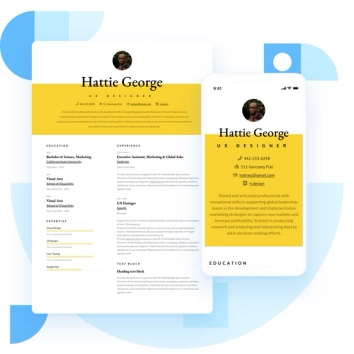
Discover the best resume formats for 2026 with examples for every job and experience level, plus expert tips to format your resume and get hired faster.
August 7, 2025
Read post

Resume Expert & VP Marketing

Learning how to write a resume in 2025 is an important step in everyone's career. This step-by-step guide with resume examples will help you get started.
February 7, 2025
Read post

Community Success Manager & Resume Writing Expert
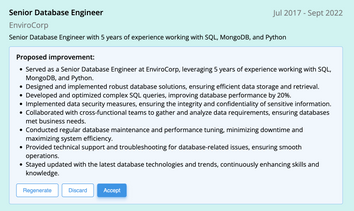
AI can change the way you write, and your resume is no exception.
November 27, 2023
Read post
Community Success Manager & Resume Writing Expert

