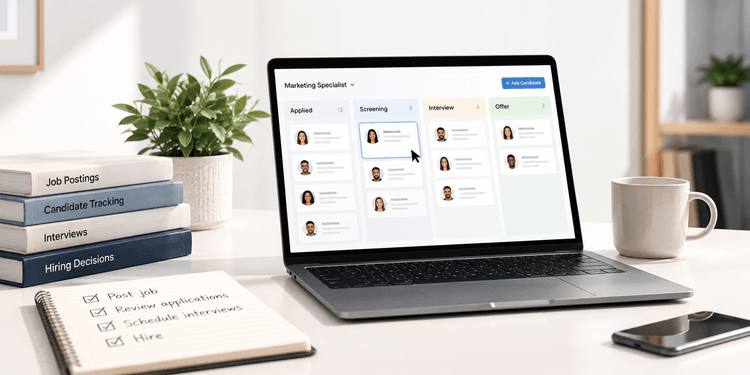
Hiring can become difficult to manage surprisingly quickly for a small business. Applications start arriving through multiple job boards and inboxes, interview notes get stored in different places, and keeping every candidate moving through the process can require more administrative work than the hiring itself.
An applicant tracking system for small business brings those activities into one place. Instead of relying on spreadsheets, email threads, and separate scheduling tools, a small business can use ATS software to organize applicants, manage hiring stages, coordinate interviews, communicate with candidates, and maintain a clearer record of each hiring decision.
With more than 7 million users in over 125 countries, VisualCV has seen how strongly applicant tracking systems shape the way resumes are submitted, parsed, and reviewed. As a resume-building platform focused on helping job seekers create ATS-friendly applications, VisualCV understands that an effective hiring process depends not only on how employers manage candidates, but also on how reliably applicant information moves through the systems they use.
This guide explains how an applicant tracking system works, when a small business is likely to benefit from one, which features matter most, what ATS software can cost, and what to evaluate before choosing a platform.
| Area | Without an ATS | With an ATS | Why It Matters |
|---|---|---|---|
| Candidate tracking | Applications are managed across inboxes, folders, or spreadsheets | Candidate records are stored in one system | Reduces the risk of losing track of applicants |
| Job postings | Roles may need to be posted and updated manually | Job openings can be managed from a central platform | Saves time and keeps listings consistent |
| Hiring stages | Progress is tracked manually | Candidates move through defined stages | Makes it easier to see where each applicant stands |
| Team collaboration | Notes and feedback may be scattered | Hiring managers can review shared candidate information | Helps teams make more consistent decisions |
| Candidate communication | Updates are sent individually | Messages and status updates can be managed more systematically | Improves response consistency |
| Reporting | Hiring data must be compiled manually | Recruiting activity can be tracked in one place | Gives small businesses better visibility into hiring performance |
For small businesses, the main value of an applicant tracking system is organization. ATS software can reduce manual coordination, create a more consistent hiring process, and give everyone involved in recruiting a clearer view of candidate progress.
An applicant tracking system, or ATS, is software that helps employers manage candidates throughout the hiring process1. For a small business, it can replace a patchwork of spreadsheets, inboxes, shared documents, and manual reminders with one system for organizing applications and tracking progress.
Most ATS platforms allow employers to collect applications, review resumes, move candidates through hiring stages, record notes, coordinate interviews, and communicate with applicants. Some also include job posting tools, reporting, automation, and integrations with other HR or recruiting software.
For small businesses, the goal is usually not to build a complex recruiting operation. It is to create a more consistent process that is easier to manage as hiring activity grows.
| Hiring Stage | What the ATS Does |
|---|---|
| Job opening | Creates or manages the role and associated hiring workflow |
| Application | Collects resumes and candidate information |
| Screening | Helps employers review, organize, and filter applicants |
| Interview | Tracks interview stages, schedules, notes, and feedback |
| Selection | Keeps candidate evaluations and decisions in one place |
| Hiring | Records the final decision and supports the transition to the next HR process |
An ATS also affects the applicant side of the process. Because resumes are often parsed and organized by recruiting software before a hiring manager reviews them, candidates benefit from submitting documents with clear formatting, recognizable section headings, and readable content. This is one reason ATS-friendly resume structure remains important even when the system itself is designed for employers.
A small business does not necessarily need an applicant tracking system from its first hire. Email and spreadsheets can work when hiring is occasional, only one person manages the process, and the number of applicants is small enough to track manually.
An ATS becomes more useful when hiring starts to involve more people, more open roles, or more candidates than a simple manual system can handle reliably. At that point, the issue is usually not just volume. It is visibility. Hiring managers need to know who has applied, which candidates have been reviewed, what feedback has been collected, and what needs to happen next.
A small business may also benefit from ATS software when recruiting tasks are taking time away from other HR responsibilities. Centralizing candidate records, interview notes, communications, and hiring stages can reduce repetitive administrative work and make the process easier to manage.
| Sign | What It Can Look Like |
|---|---|
| Candidate information is scattered | Resumes and notes are stored across inboxes, folders, and spreadsheets |
| Multiple people are involved in hiring | Managers have different versions of candidate information or feedback |
| Applicants are difficult to track | The team is unsure who has been contacted, interviewed, or rejected |
| Communication is inconsistent | Candidates receive delayed or uneven updates |
| Hiring data is hard to find | Basic information about applications, interviews, or time to hire must be compiled manually |
| Recruiting administration is increasing | HR or managers spend too much time updating spreadsheets and coordinating next steps |
The right time to adopt an ATS depends less on company size than on hiring complexity. A business with 20 employees and frequent hiring may benefit from one sooner than a larger company that only recruits occasionally.
A small business does not necessarily need an applicant tracking system from its first hire. Email and spreadsheets can work when hiring is occasional, only one person manages the process, and the number of applicants is small enough to track manually.
An ATS becomes more useful when hiring starts to involve more people, more open roles, or more candidates than a simple manual system can handle reliably. At that point, the issue is usually not just volume. It is visibility. Hiring managers need to know who has applied, which candidates have been reviewed, what feedback has been collected, and what needs to happen next.
A small business may also benefit from ATS software when recruiting tasks are taking time away from other HR responsibilities. Centralizing candidate records, interview notes, communications, and hiring stages can reduce repetitive administrative work and make the process easier to manage.
| Sign | What It Can Look Like |
|---|---|
| Candidate information is scattered | Resumes and notes are stored across inboxes, folders, and spreadsheets |
| Multiple people are involved in hiring | Managers have different versions of candidate information or feedback |
| Applicants are difficult to track | The team is unsure who has been contacted, interviewed, or rejected |
| Communication is inconsistent | Candidates receive delayed or uneven updates |
| Hiring data is hard to find | Basic information about applications, interviews, or time to hire must be compiled manually |
| Recruiting administration is increasing | HR or managers spend too much time updating spreadsheets and coordinating next steps |
The right time to adopt an ATS depends less on company size than on hiring complexity. A business with 20 employees and frequent hiring may benefit from one sooner than a larger company that only recruits occasionally.
The best applicant tracking system for a small business is usually not the one with the most features. It is the one that makes the hiring process easier to manage without adding unnecessary complexity.
For smaller teams, the highest-value features tend to be the ones that improve organization, communication, and collaboration4. These functions help HR staff and hiring managers spend less time on administrative tasks while keeping candidate information easier to access.
A strong ATS should make it easy to see where every applicant is in the hiring process. Candidate profiles, status updates, notes, and application history should be available in one place so the team does not have to piece together information from separate files or inboxes.
Many ATS platforms let employers create a job opening once and distribute it across multiple recruiting channels. For a small business, this can reduce repetitive posting work and make it easier to keep job information consistent.
Built-in email templates, status updates, and messaging tools can help small teams communicate more consistently with applicants. This is especially useful when several people are involved in hiring or when multiple roles are open at the same time.
Interview scheduling, shared notes, feedback forms, and scorecards can make candidate evaluation more structured. These tools also give hiring managers a clearer way to compare applicants and document why decisions were made.
Small businesses may not need advanced recruiting analytics, but basic reporting can still be valuable. Metrics such as application volume, interview activity, source of hire, and time to hire can help teams identify where the hiring process is slowing down.
An ATS should also fit into the tools the business already uses3. Integrations with email, calendars, job boards, HR software, or payroll systems can reduce duplicate work and make the recruiting process easier to maintain2.
| Feature | Priority for Small Businesses | Main Benefit |
|---|---|---|
| Candidate pipeline | High | Keeps applicants organized |
| Job posting tools | High | Reduces repetitive recruiting work |
| Candidate communication | High | Supports more consistent follow-up |
| Interview scheduling | High | Simplifies coordination |
| Shared notes and scorecards | High | Improves collaboration |
| Reporting | Medium to High | Gives teams visibility into hiring activity |
| Integrations | Medium to High | Reduces duplicate data entry |
| Advanced automation | Depends on hiring volume | Saves time as recruiting activity grows |
For most small businesses, the best approach is to prioritize the features the team will use regularly. A simpler ATS that fits the existing hiring workflow can be more valuable than a more complex platform with tools that rarely get used.
Choosing an applicant tracking system starts with understanding where the current hiring process creates the most friction. For one business, that may be keeping track of candidates. For another, it may be coordinating interviews, collecting feedback, or maintaining consistent communication.
The right ATS should solve those specific problems without making the process harder to use. Small businesses often benefit from systems that are easy to adopt, require limited training, and fit into the tools employees already use.
Before comparing platforms, identify how often you hire, how many people are involved in recruiting, and which parts of the process take the most time. This makes it easier to separate essential features from tools that may sound useful but are unlikely to be used regularly.
An ATS may be powerful, but that matters little if hiring managers avoid using it. Look for a system with a clear interface, simple workflows, and enough flexibility to match the way your team already hires.
Review whether the software connects with the tools you already rely on, such as email, calendars, job boards, HR platforms, or payroll software. Strong integrations can reduce duplicate data entry and make adoption easier.
Pricing should be evaluated in the context of hiring volume and the number of people who will use the platform. A lower-cost system can still be poor value if key features require paid upgrades, while a more expensive platform may be unnecessary if most of its capabilities will go unused.
The system should work for your current needs while leaving room for the hiring process to become more structured over time. That does not mean buying an enterprise-level platform early. It means choosing software that will not need to be replaced as soon as the team or hiring volume grows.
| Question | Why It Matters |
|---|---|
| How many people will use the ATS? | Some platforms price by user or limit collaboration |
| How many roles do we hire for each year? | Hiring volume can affect both pricing and feature needs |
| Which recruiting tasks take the most time? | Helps identify the features that will provide the most value |
| Does it integrate with our current tools? | Reduces duplicate work and improves adoption |
| Can hiring managers use it easily? | A system only works if the team actually uses it |
| What does the total price include? | Helps uncover add-on, onboarding, or feature costs |
| Can it support our future hiring needs? | Reduces the risk of needing to switch systems too soon |
For a small business, the strongest choice is usually the ATS that solves the most important hiring problems with the least unnecessary complexity.
ATS pricing can vary widely based on the platform, number of users, hiring volume, and features included. For a small business, the most important question is not simply which system has the lowest monthly price, but whether the pricing structure matches how often the company hires and which tools it actually needs.
Some applicant tracking systems use flat monthly or annual subscriptions, while others charge based on users, active jobs, hiring volume, or feature tiers. Additional costs can also come from onboarding, premium support, integrations, reporting tools, or advanced automation.
A lower-priced platform may be a good fit for a business with simple hiring needs, but it can become more expensive if essential features are locked behind add-ons. Likewise, a more comprehensive ATS may offer poor value if a small team only uses a fraction of its capabilities.
| Cost Factor | What to Evaluate |
|---|---|
| Number of users | How many HR staff and hiring managers need access |
| Hiring volume | How many roles or applicants the business manages |
| Feature tier | Whether core recruiting tools are included or require upgrades |
| Integrations | Whether connections to other systems cost extra |
| Onboarding | Whether setup, training, or implementation fees apply |
| Support | Whether premium support is included or sold separately |
| Contract terms | Whether pricing changes for monthly or annual commitments |
Small businesses should compare the total cost of ownership rather than the advertised starting price. That means looking at the base subscription, required add-ons, implementation costs, and whether the software can continue to meet the company’s needs as hiring activity grows.
An applicant tracking system can make hiring easier to manage, especially when a small business is moving beyond informal recruiting processes. The main benefits come from centralizing information, creating a more consistent workflow, and reducing the amount of manual coordination required from HR staff and hiring managers.
At the same time, ATS software is not automatically a good fit for every small business. The value depends on how often the company hires, how complex the recruiting process is, and whether the team will actually use the system consistently.
A centralized system can make it easier to keep resumes, candidate notes, interview feedback, and hiring decisions in one place. This improves visibility and reduces the chance that important information is lost across inboxes or spreadsheets.
An ATS can also help standardize recruiting. Defined hiring stages, shared evaluation criteria, and more consistent candidate communication can make the process easier to follow for everyone involved5.
For growing businesses, another advantage is scalability. A process that works for a handful of applicants may become difficult to manage when hiring volume increases, while an ATS can provide more structure without requiring the team to rebuild its workflow each time.
The main drawback is added cost and complexity. A small business that hires only occasionally may not get enough value from a dedicated ATS to justify the subscription and setup effort.
Implementation can also require time. Even a relatively simple platform may need configuration, user training, and changes to existing hiring habits before the business sees the full benefit.
Some systems can also be more complex than a small team needs. Features designed for enterprise recruiting may add cost or make the platform harder to use without improving the day-to-day hiring process.
| Benefits | Potential Limitations |
|---|---|
| Centralized candidate information | Added software expense |
| Easier applicant tracking | Requires setup and onboarding |
| More consistent hiring workflows | Team adoption can take time |
| Better collaboration between hiring managers | Some platforms may be overly complex |
| More organized candidate communication | Advanced features may go unused |
| Better visibility into recruiting activity | May offer limited value for very occasional hiring |
For a small business, the decision should come down to whether the ATS removes more friction than it creates. If the system saves time, improves organization, and makes hiring easier for the people using it, the investment is more likely to be worthwhile.
Manual applicant tracking can work well when a small business hires infrequently and only one or two people are involved in recruiting. In those cases, email folders, spreadsheets, and shared documents may provide enough structure without adding another software platform.
The limitations become more noticeable as hiring activity increases. Candidate information can become fragmented, status updates may be missed, and hiring managers may rely on different versions of the same notes or spreadsheets. An ATS reduces that fragmentation by giving the team one place to manage applicants and hiring activity.
The key difference is scalability. Manual tracking depends heavily on people remembering to update records and communicate changes, while ATS software creates a more structured process that can support a larger number of candidates, roles, and collaborators.
| Factor | Manual Tracking | ATS Software |
|---|---|---|
| Low hiring volume | Often manageable | May be optional |
| Candidate records | Stored across inboxes, folders, or spreadsheets | Centralized in one system |
| Hiring stages | Updated manually | Tracked through defined workflows |
| Team collaboration | Depends on shared documents and messages | Candidate notes and feedback are easier to centralize |
| Reporting | Requires manual compilation | Often available within the platform |
| Process consistency | Depends on individual habits | More standardized |
| Scalability | Becomes harder as volume grows | Better suited to growing hiring needs |
A small business does not need to replace a manual process simply because ATS software exists. The stronger reason to make the switch is when the existing process starts creating delays, missed information, or unnecessary administrative work.
Before choosing an applicant tracking system, small businesses should look beyond feature lists and focus on how well the platform fits their actual hiring process. A system may appear comprehensive on paper but still create friction if it is difficult to use, poorly integrated with existing tools, or priced around features the team does not need.
Ease of adoption should be a major consideration. Hiring managers who only use the system occasionally need to be able to understand the workflow quickly, while HR staff should be able to manage candidates without unnecessary administrative steps.
It is also worth looking at how well the ATS supports the candidate experience. Clear application forms, reliable resume parsing, straightforward communication, and an easy-to-follow application process can all affect how smoothly candidates move through the system.
| Evaluation Area | Question to Ask |
|---|---|
| Usability | Can HR staff and hiring managers use it with minimal training? |
| Core features | Does it solve the main problems in our current hiring process? |
| Candidate experience | Is the application process clear and easy to complete? |
| Resume handling | Does the system parse and organize candidate information reliably? |
| Integrations | Does it connect with the tools we already use? |
| Pricing | Is the total cost reasonable for our hiring volume and needs? |
| Scalability | Can it support more hiring activity as the business grows? |
| Support | What onboarding and customer support are available? |
| Reporting | Does it provide the recruiting data we actually need? |
| Permissions | Can access be managed appropriately across the hiring team? |
A useful final test is whether the system makes recruiting easier for both the employer and the applicant. For small businesses, the strongest ATS is usually the one that improves organization, keeps the hiring process consistent, and removes unnecessary manual work without introducing more complexity than the team can reasonably manage.
There is no single best applicant tracking system for every small business. The right choice depends on hiring volume, team size, budget, integrations, and which recruiting tasks the business wants to simplify.
Not every small business needs an ATS. It becomes more useful when hiring involves multiple people, candidate information is difficult to track manually, or recruiting administration starts taking up too much time.
ATS pricing varies by provider and may depend on users, active jobs, hiring volume, feature tier, or contract length. Small businesses should compare the total cost, including any onboarding, support, integration, or add-on fees.
An applicant tracking system is generally focused on managing candidates and hiring workflows. Recruiting software is a broader category that can include ATS functionality along with sourcing, scheduling, assessment, communication, analytics, and other recruiting tools.
Yes. An ATS can still be useful with a very small HR team if it reduces manual work, centralizes candidate information, and makes it easier for hiring managers to participate in the process.
An applicant tracking system for small business can bring more structure to hiring by centralizing candidate information, standardizing workflows, and reducing the amount of manual coordination required from HR staff and hiring managers. The right system should match the company’s actual hiring needs, remain easy for the team to use, and support growth without adding unnecessary complexity.
For small businesses, the goal is not to adopt the most advanced ATS available. It is to choose software that makes recruiting more organized, improves visibility across the hiring process, and creates a smoother experience for both employers and applicants.
Last updated: October 06, 2026
McLaren, Samantha. “What Is an Applicant Tracking System (ATS) and How Can It Support Your Business?” LinkedIn Talent Solutions, November 7, 2019. https://www.linkedin.com/business/talent/blog/talent-acquisition/what-is-an-applicant-tracking-system
Indeed Employer Content Team. “Streamline Your Hiring Process with Indeed’s ATS Integrations.” Indeed, July 14, 2026. https://www.indeed.com/hire/resources/howtohub/indeed-ats-integrations
Indeed. “Applicant Tracking System | ATS Integrations.” Indeed, 2026. https://www.indeed.com/hire/ats-integration
Indeed. “Candidate Tracking Software: Scale and Automate.” Indeed, 2026. https://ca.indeed.com/hire/lp/candidate-tracking-software
LinkedIn Talent Solutions. “10th Annual LinkedIn Talent Connect: Our Vision for the Future of Talent.” LinkedIn, 2019. https://www.linkedin.com/business/talent/blog/product-tips/linkedin-talent-connect-our-vision-for-future-of-talent

Written by
Madison Norton
Resume Expert & VP Marketing
Madison is the VP Marketing and General Manager at VisualCV. He's a seasoned marketing leader, resume writing and career marketing expert and now helping people grow their own career marketing strategies to build a career they love.
Discover the best resume formats for 2026 with examples for every job and experience level, plus expert tips to format your resume and get hired faster.
August 7, 2025
Read post

Resume Expert & VP Marketing

Learning how to write a resume in 2025 is an important step in everyone's career. This step-by-step guide with resume examples will help you get started.
February 7, 2025
Read post

Community Success Manager & Resume Writing Expert
AI can change the way you write, and your resume is no exception.
November 27, 2023
Read post
Community Success Manager & Resume Writing Expert